-
Aa
+
Log In
Windows
All Topics
Installation
Setup
Application
Office
All Topics
Outlook
Excel
Word
Power-Point
Search
Log In
Compertise
Office
Office
Outlook
Outlook
We have found
32
articles
Outlook Lite is coming to an end on smartphones: Don’t waste any time—make the switch now
Are you still using Outlook Lite on your Android device? As of 25 May 2026, the app has been fully discontinued and no longer provides access to your inbox. The...
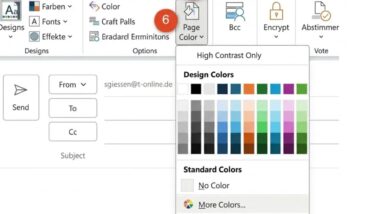
Add your favorite color and the matching font color to all emails
Staring at a plain white screen every time you compose an Outlook email doesn't have to be the norm. Changing the background colour in Outlook is straightforward — and it...
So your photo lands directly in the message text without an extra click
Word's table function is the simplest way to align text and images neatly — no fiddling with text wrapping or manual spacing required. By setting up a two-row, two-column table...
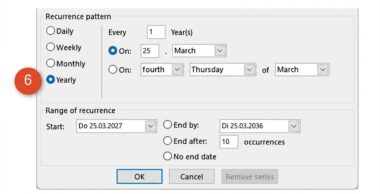
No contact? How to enter the birthday in the calendar anyway
A birthday reminder in Outlook doesn't require a new contact — just a few clicks in your Outlook calendar and the date is locked in for years to come. Open...
Simply faster: How keyboard shortcuts make your daily work in Microsoft Office easier
Keyboard shortcuts in Microsoft Office save time, protect your wrist, and keep your focus on the work — without constantly reaching for the mouse. Simply press the Alt key to...
Tidying up at the start of the year: 3 tips to help you work even better with Outlook
Regularly cleaning out Outlook keeps your mail programme fast and your inbox manageable. Delete old emails via File > Tools > Mailbox Cleanup, search for messages over a year old,...
Rest your eyes and put your feet up: let Outlook read out your e-mails
The “Read Aloud” feature in Outlook and Word lets you listen to texts and emails with ease. Start playback with a click or keyboard shortcut, follow the highlighted word, and...
Copy multiple e-mail addresses from Word to Outlook in an instant
Stop copying email addresses from Word into Outlook one by one. Select all the addresses you need, copy them with a single command, then paste them directly into the To...
This makes it much easier to recognize the buttons in the quick access toolbar
Moving the Quick Access Toolbar below the ribbon in Microsoft applications takes just two clicks — and makes a noticeable difference. Icons appear in black on a light background for...
Thanks to these tips, you will no longer overlook important emails with attachments in your inbox
Never miss an email with an attachment again. In Outlook, you can sort all emails carrying attachments straight to the top of your inbox with a single click on the...
My 3 best efficiency tips for your Outlook calendar
Three quick tips make the Outlook Calendar far more powerful. Hold Ctrl and click individual dates in the date navigator to view only selected days — such as every Friday...
The „Screenshot“ command: Ideal for precisely documenting messages or information on the monitor
Office's built-in Screenshot tool lets you capture any open window and insert it directly into Word, Excel, Outlook or PowerPoint in seconds. Use the Screen Section option to capture only...
Done in a flash: simply add a photo to a contact
Adding a photo to your Outlook contacts makes faces far easier to recall. Switch to People view, open a contact, click the photo placeholder, choose your image, then save. Need...
How Outlook automatically reminds you to charge the battery or take out the organic waste garbage can
Never miss a recurring task again with Outlook's series reminders. Create a single task, set the start date and reminder time, then turn it into a series with your chosen...
10-minute units instead of 30 minutes: How to note your appointments even more accurately in your calendar
Do appointments seem to overlap in your Outlook calendar? The default 30-minute time scale may be hiding back-to-back meetings. The fix takes seconds: right-click the time scale on the left-hand...
15
of
32
articles
Load
15
more articles
We couldn't find any results for your search term!