No contact? How to enter the birthday in the calendar anyway

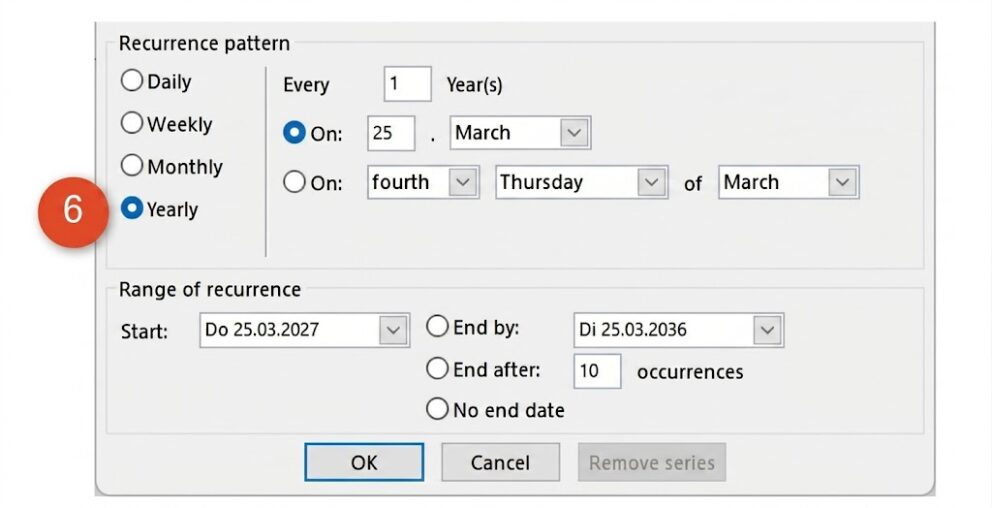
A birthday reminder in Outlook doesn't require a new contact — just a few clicks in your Outlook calendar and the date is locked in for years to come. Open the calendar with Ctrl + 2, then use Ctrl + G to jump directly to the birthday date and switch to the daily view. Double-click on that day to open the Appointment dialogue, enter a clear title such as "Evelyn's birthday", and tick the All day box. Click Convert to series, set the recurrence to Yearly, and confirm — your recurring event is set. Save and close, and Outlook will flag the date automatically every year without any contact record needed. For added reliability, set a reminder one day in advance so you have time to send a message or arrange a gift.
No contact? How to enter the birthday in the calendar anyway

Peter D. asks:
Yesterday I forgot the birthday of my clubmate Kurt’s wife. When I called to ask Kurt something, I disturbed the party. It was very unpleasant. I put Kurt’s birthday in my calendar via my contacts. However, I don’t want to create a new contact for his wife. Is it possible to enter a birthday in the calendar without adding a contact?

Hiroshi Nakanishi answers:
Dear Mr. D., Outlook offers a simple and effective solution to maintain personal ...


Premium article

This article is part of our Premium subscription. Unlimited access to over 500 guides.